Radio RX:
http://www.banggood.com/de/FrSky-XSR-2_4GHz-16CH-ACCST-Receiver-S-Bus-CPPM-Output-Support-X9D-X9E-X9DP-X12S-X-Series-p-1031481.html
Attention: EU-LBT Firmware - had to flash the receivers FW to nonEU
this video was helpful with the cabling: https://www.youtube.com/watch?v=sHHmNhYlGJs&t=428s
Once the binding suceeded (Taranis - XSR with D16 C1-16 mode)
I just turned on my FPV monitor and instantly saw the TX wizard on the vortex. This is what I already loved on the Vortex250!
Setting up the sticks was so easy - no need for a PC with cleanflight config software.
OSD looks quite similar to the Vortex250
VTX Power:
1-600mw? ce version is locked to 25mw (rumors say you can unlock it?)
Low 25 200 350 max
Battery: 850mah 4cell
Flighttimes: around 3-5mins (depending on throttle and battery of course)
Connectors: the mini Vortex uses XT30 connectors! (I resoldered a XT60 on so I could use the batteries connectors without resoldering all of them).
Props:
no bullnose, HQ 3x3x3, racekraft 3x3x3, or not as good the gemfan 3x3.5x3
all those in 4 blade should work also
I bought this drone, didnt get it from DJI but ordered it via Globe-Flight.de. This is my trusted shop (I ordered my firest FPV set back in 2008 at this shop).
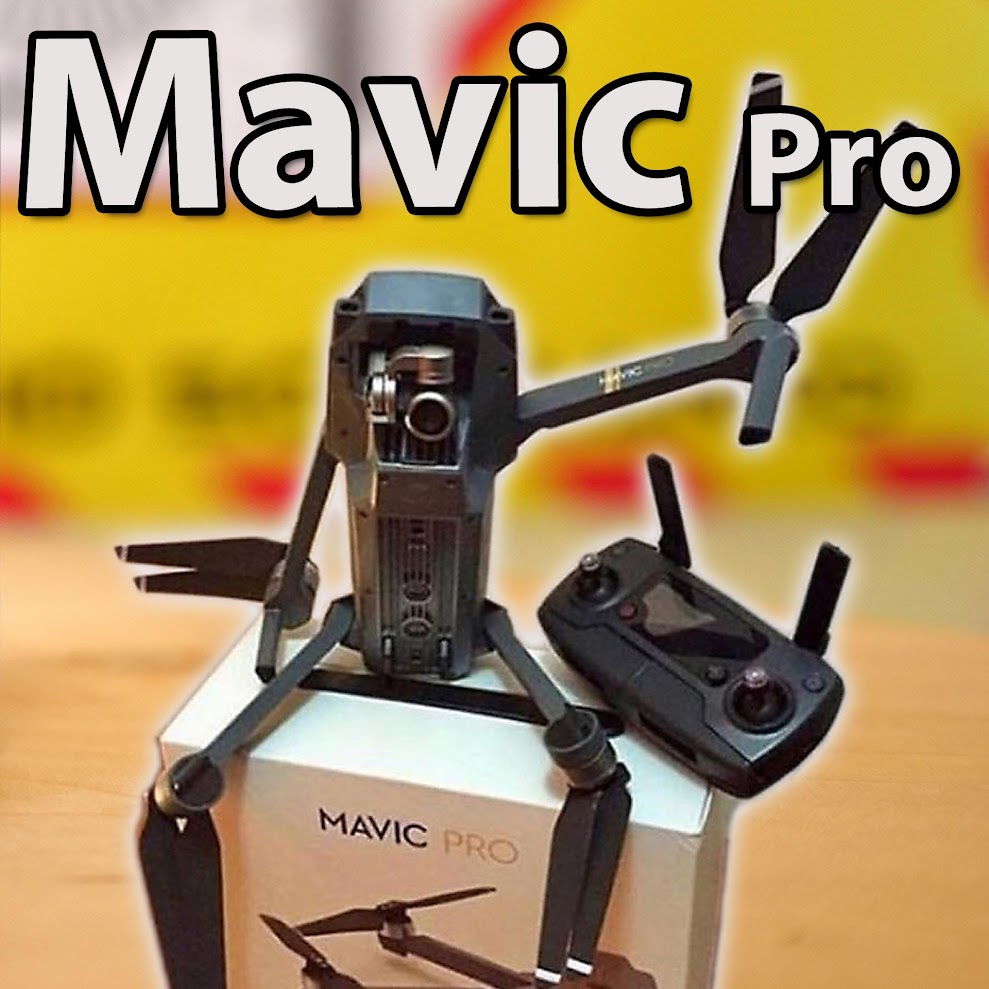
I have a lot of drones - the Mavic makes most of them obsolete now :(
I started with the tricopter in 2011, got the TBS discovery with DJI naza in 2012 (which was my first GPS position hold, return home platform back then!). Later got into AP ships with brushless gimbals (DJI Phantom2, Black Snapper, Xugong). I still fly the Phantom 2 from time to time - but a 2axis gimbal just doesnt look good anymore :) Tried the Inspire1 and the Phantom4 when I had the chance to - but after the first playing around with it I didnt actually buy one (cause I had so many similar drones already).
Now since I skipped P3 and P4 I thought it was time to get this really tiny, backpack friendly, worry free drone. It's ready for flying in 2-3mins and has so many functions built in - a few years ago you would have needed a whole trunk full of expensive FPV gear to yield the same results (if possible at all).
What I love about this one:
- very easy to handle
- small, compact, well thought out
- super cam quality (best in this size cat) you can print stills to large format and even can take RAW pics!
- great range / video transmission
you just have a smooth 720p image, without intereference, without the permanent fear of flying blind suddenly
you can switch to 1080p live video - but then the recorded video is also 1080p
I even flew it from inside my car to a nice distance (more then enough) without even loosing signal or stuttering video!
- flighttimes - 20mins for sure - which is really more than you need normally!
- very well designed remote controller
- bright display (ok this is rather depending on your phone - I have the Galaxy S7 which is very bright)
- DJI Go app: great functions!
highlight: it records downlink video in great quality directly on your phone as well (ok that's not new with the mavic).
also records all flight data in a log file! so you can even replay the GPS data and see how you flew, where, what happend, how you moved the sticks... really great log functions (cool for a statistics nerd like me).
- easy to catch with the hand (carefully though!) - landing in grass or dust is not optimal. Having to use a landing pad would also kill some of the ultra portability...
- silent, doesnt draw a lot of attention on you
some problems I found:
- DISCONNECT problem
this is maybe the biggest issue I had, but maybe they already fixed it (not happend again yet):
what happend? on a flight, the app went into black/white and said it's disconnected. Restarting the app didnt help. While this happend my Mavic was far away, I was blind. But I could use the remote still. So I pressed the RTH button and luckily it came back reliable!
things I do now to prevent this:
I close all apps on the phone before using DJI Go app,
have it in airplane mode,
SAMSUNG S7: I turn OFF the "quickcharge with cable" function in powersettings - one theory of mine: the phone sucks to much power out of the remote while charging and the remote cuts the connection
try to run it with as much phone battery as possible
also got 2 DJI go app updates since then, and on 7.Nov. they published a new mavic firmware - INSTALL this asap!
- sometimes cam/gimbal does shake (on sudden change of flight direction - so go smooth!)
regarding go smooth: there are some guidlines out yet, how to finetune the YAW endpoints, YAW expo and also smoothing out the gimbal movements - this all helps to get much smoother shots. Best yet I find it to just fly straight "like on rails or a cable cam" and let this impress your viewers - stunningly smooth and crips clear 4k footage!
- gimbal looks very fragile! It hangs on weak rubber (for vibration dampening) and if not protected with the plastic part for locking the gimbal - the cam shakes a lot - so DONT transport it without this plastic protection!
- obstacle avoidance can get irritated by sunlight or fog as well - if this happens - SWITCH to sport mode and be able to come home thru these invisible obstacles that your drone wants to avoid :)
- in higher winds normal GPS mode is to slow - also switch to Sport mode to fight the headwinds!
NEVER fly too far away with tailwind - you might underestimate the distance and power needed to come back against a strong wind. This might lead to an unplanned landing far away from you (in worst case you're flying home over the water against wind!)
- GPS / compass error if you want to start from the roof of your car
- DJI Go app: IOS has better language support (german available), Android version has NO german language...
you can get LITCHI which is also available in german (other languages?)
- 1080p60 seems to look aweful (aliasing, steps)
Advice "fly more!":
I bought the "fly more" package - you should too!
When you buy the normal package - you will end up ordering a 2nd maybe 3rd battery soon after (because only one batt is never good).
If you buy 2 batteries seperatly - this is almost the same price than the "fly more" pack!
(and this pack includes also: the car charger, the 4x serial charging hub, the nice carrying case, powerbank adapter, props).
Of course you also should do enough training flights with the drone on safe grounds (large field) before you start taking it with you and fly anywhere.
This is a great racing drone kit! The components are pretty decent, well thought out (like the powercube style electronics, CCD Cam usage), the quad is durable (although I didnt crash it yet) but lightweight.
Build is simple but there are some setup tips (in cleanflight and in the OSD) which you should read here to have an easier build.
OSD: you can even change PIDs in the OSD with your remote (like I know it from my Vortex).
The VTX power of course is not 25-600mw as advertised - rather 20-300mw - but that's fine. Switching the power can kill the VTX which is about the only problem I found here. Ok - you will see that the video downlink has a vibration issue (maybe loose board in the Runcam Swift?).
Find all the Specs here
And buy it for around 250$ in most of the chinese RC stores. They suggested I should get an affilate link, but I think this could affect my reviews in a way I dont like.
Video Index:
00:46 Unbocing
03:47 Buildtips
05:30 Soldering ESCs
06:42 motor direction
07:46 important cleanflight tips
07:58 VTX Settings (channel...)
08:57 VTX Power switching (25-300mw)
11:25 Maidenflight
11:58 Maidenflight #2 :)
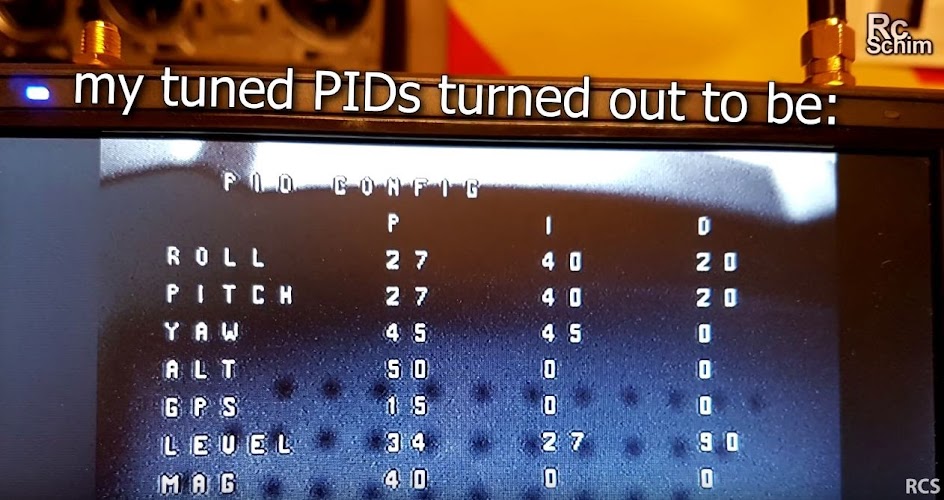
12:28 my tuned PIDs
13:14 Speedtests and FPV footage on the field
15:09 --- A LOT OF SCREAMING HERE ---
ESCs set motordirection in blheli suite?
- there is a drawing in the RCGthread but you can also use blheli suite to correct directions in software
PIDs should be preset in factory no they werent. PIDS see video.
X4r SBus Connection
use the UART3 and turn on radio switch in Cleanflight / Ports tab, use Serial / Sbus setting in Receivers Tab
►OSD (I think it's a MinimOSD integrated in their VTX board):
THR=mid + YAW=right + Pitch/Nick=full = go into OSD menu
if this doesnt work, your OSD board doesnt have a connection to FC board (was the case for me). you might also have "no data" in OSD.
Solution: in Cleanflight Config / PORTS Tab: set UART2 Data/MSP to on!
To switch VTX Power:
hold vtx ch button
power on the quad (then the band LED will blink slow for LOW mode and fast for HIGH mode).
Danger! Do not switch to often, use the smallest possible battery.
24.5.2016 - update! see PIDs and settings on the bottom!
Quick Tipps
LED Board button
Press 2sec to change VTX BAND
Press 5sec to enther TX Setup Wizard
Arm Motors: Throttle=0, YAW=right
Disarm: Throttle=0, YAW=left
Enter OSD: Throttle=0, YAW=left (while Motors are disarmed)
(if you cant arm or dont get into the menu: try trimming yaw more to right or left - your stick "servo-way" is not 100% - set rates on your radio to 100% and repeat the TX Wizard!)
►►GPS Support?
Immersion told me, if you use a "supported" GPS ezOSD will use it and show speed and distance. Anyone already tried this? I'll see if I can get more info on this...
►Tech Specs: Size (diagonal): 250mm (275mm option for 6" Props) Frame: 2mm CF, with 15x Aluminium Standoffs Arms: 4mm Flat CF Motors: vSpec 2204-2300kV, 3mm Shaft ESC: 20/22A EzESC, OneShot125, rotorSENSE Flight Controller: STM32F303 based ('F3') OSD : Full Graphic
BlackBox: 2MB Included
Rx Support: Native CPPM, S-Bus, Spektrum, XBus, SumD, SumH
Rx Selection: Fully Automatic
Camera Mount: GoPro 3/4, mount included
USB Port: Through-Hole FlightCam: 650TVL CCD (HS1177) (this is an important change vs the stock cam, see this video for comparison) weight: 671gr (with gopro+ 1300mah 4s)
451gr all except hd cam and batt)
PIDs: (24.05.2016 modified the Protune 12 - ummagawd) I use: all on stock and: 1800mah 4cell Turnigy graphene (heavy!) 3 bladed DYS props 5x4.5x3 Bullnose RollP3.5 I0.052 D38 PitchP4.1 I0.050 D42 YawP6.7 I0.062 D38 (AltP5.0 I0.000 D0 VelP12.0 I0.045 D2 LevelP4.6 I0.050 D113 ) all of this on default RC Rate1.15 RC Expo0.50 Roll Rate0.70 Pitch Rate0.60 Yaw Rate0.65 RC Yaw Expo0.50 TPA0 ThrottleExp0.00 Looptime1000 PID Contr. MWRewrite Airmodeon BL Version1.0.0.3 OSD Ver.10.0.0.26 LED Ver.10.0.0.2 HW Ver.Fusion Gen 2 FC Ver.2.5.3 BTFL API Ver.1.16
Get the Quad here: www.Globe-Flight.de This is my first really fast Quadcopter. The Trincopter was quite fast also, but this smaller one here has tilted motors - which makes all the difference! It's just so cool to feel this "urge to fly forward fast" from the quad! Nice option here to change a few screws and have the motorarms straight or angled (3 steps: 0°, 10° or 20°). The build was fairly easy, you have a good ammount of space in the quad. Battery compartment is large enough to hold an 2250 4cell - maybe even larger. But the best performance is achievable with small and extreme Lipos (1300mah Gensace 75C). ESCs: 4x 12A SimonK Maytech (without BEC) Motors: 4x T-Motor MN2206 - 2000KV Props: 6x4.5 ABS Gemfan Carbon reinforced Battery: 1300mah 4cell Gensace 75c (3mins) / 2200mah 4cell Turnigy 45C (6mins) Weight: 720 / 820gr (with either Gensace or Turnigy) (Vendor): 620g (3s1300) - 700g with 4s1300 and Mobius Seperate BEC for powering the Naze32 board Flightcontroller: Naze32 with cleanflight 1.10 and Luxfloat PIDcontroller https://quadcoptersenzo.nl/en/Flightcontrollers/naze32_acro_funfly
PID Tuning: BLHeli FW / ONEShot125 8.12.2015: Updatedthe PIDs below after some testflights with the new setup. Flies quite stable and smooth now! Cleanflight 1.10 Oneshot125 enabled Controller 2-Luxfloat
P
I
D
Rate
Roll
1,1
0,040
30
0,40
Pitch
1,7
0,045
30
0,40
Yaw
5,0
0,150
1
0,30
feature RX_PPM
feature FAILSAFE
feature ONESHOT125
set looptime = 2400
set rc_rate = 110
set rc_expo = 60
set rc_yaw_expo = 0
set thr_mid = 50
set thr_expo = 0
set roll_rate = 40
set pitch_rate = 40
set yaw_rate = 30
set tpa_rate = 53
set tpa_breakpoint = 1500
Issue with Yaw on fast miniquads (not only this here): Reproduceable - on 45° dives from some alt and with some speed, you "feel" that yaw get's unstable and suddenly it snaps 90° (or more?) to the right (most of the times). I tried so many things (mostly PID tuning and trying different PID controllers in Cleanflight 1.9.0) but nothing helped. After I changed to DIFFERENT PROPS! the problem went away. First set of props were normal, plastic Gemfan 5x4 (balanced with sandpaper) and the new ones were also Gemfan 6x4.5 carbon reinforced ones. I think with the weight of around 800gr the quad was too heavy for the small props. UPDATE: my friend Prometreus was also testing this quad and found that moving to BLHeli ESC firmware and using Onshot and Active Damping help to get the quad stable. =>Video tutorial how to flash the Maytech ESCs to BLHeli Links, Tips: Black Bullet Buildlog (GERMAN) from Prometreus Black Bullet RCGroups.com Thread
Frame: Black Snapper XS from Globeflight
Dimensions (folded in): 22 x 13,7 x 2,6 cm (LxWxH)
Dimensions (folded out): 27,3 x 30,0 x 2,6 cm (LxWxH)
Frame weight (empty): 125g
Weight including electronics and without battery: approx. 320g
Motor axis diagonal: 360 mm (left to right front motor: 250mm) Motors: Eyefly 1806 (2300kv) running on 3cell 1500mah turnigy 35-70c packs. ESCs: Emax - 12A - Nano ESC Oneshot125 and Active braking (Artikelnr. 24-005)
(no BEC!)
Seperate BEC for powering the Naze32 board: BEC UBEC 3A E-Max - EMX-SC-0509
Props: 5x4 Gemfans System weight: 381gr (all except FPV gear, Battery and HDCam) around 600gr (including 150gr battery and 50gr RuncamHD) Flighttimes: around 5mins with 1500mah 3cell and average fast flying
Flightcontroller: Naze32 with cleanflight 1.10 and Luxfloat PIDcontroller https://quadcoptersenzo.nl/en/Flightcontrollers/naze32_acro_funfly Naze32 Settings: Cleanflight V 1.10 / Pid Controller: 2 - Luxfloat
General settings: oneshot125 and "active damping" (this is something that has to be enabled in the ESCs firmware) PID
Roll 1,60,04 30
Pitch 1,80,04 30
YAW 2,50,1 15
Roll and pitchrate0,40 / Yawrate 0,50
TPA0,30 TPA Bpoint1500
Receiver: all default but RCRate 1,10
But as always if you find PID settings on the internet: they dont apply to every quad. You have to have a really similar setup than I do. Every quad is usually different. Many variables influence the outcome. But this can be a good startingpoint for you if you have simlar motors and ESCs...
-
I used a nice PDB (power distribution board) which has 2 switches for LED or VTX
So I can choose if I want my LEDs to be powered on with this easy switch.
I guess you can also hook up LEDs to be controlled by the NAZE32 board as well - but this is more advanced - the PDB is really easy.
FPV Cam: ATTENTION
You need a really small FPV cam for it to fit between the front booms!
I use the Fatshark 600TVL which as a really small housing. I even had to file it down on the side a bit for a good fit.You can tilt it a bit by using more double sided tape on the top of the cam holding frame than on the bottom. Works ok for me.
HD Cam:
initially made to mount the Mobius/runcamHD type of flat cams - but gopro or SJ5000+ in my case works also. Vibration dampening works really well - even wih unbalanced motors / Props I have no jello issues!
Flighttime (in hover with gimbal and cam):
~15mins (used 1462mah for 4:39 flight and calculated the estimate flighttime for save 80% battery usage)
Pricetag:
1100€ (RTF with Copter+Charger+Gimbal+Radio+Battery)
+ 250€ for FPV Set (TFT+RX and TX)
Battery-Bay (Plastic housing):
3,5cm height
8,4cm width
housing is around 16cm deep (but you need to get cables in there...)
orig. battery without housing:
13,5cm x 7,2cm x 3,2cm 6S 6000mah 8c dicharge (48amps) 1c charge
Morpheus Gimbal: for GP3 and GP3+ (not GP4?)
Weight: 280g, 2s-4s voltage
Tilt: 90° Roll: 45° Pan: 360°
Flight controller Gains:
without gimbal: (set per default)
Roll: 55
Pitch: 55
Sway: 95 (Yaw)
WITH gimbal (a bit heavier)
Roll: 45
Pitch: 45
Sway : 80 (Yaw)
FPV Set:
7" TFT monitor with sunshade and good brightness!
Internal battery, chargeable via USB plug.
8ch: 5733 5752 5771 5790 5809 5828 5847 5866
I was patiently waiting for this little tech stuffed drone to come out. I bought the AR.Drone 1 back than and loved the new concept. Skipped AR Drone 2 because I didn't see much difference (and had enough other quads) but this one was on my wishlist!
It's a wifi controlled flying cam rather than a drone. It looks like a camcorder with arms and props ;-)
___________________________________
Tech spces:
- weight: 393gr (without bumpers)
- flying time (11mins? I estimate 8-10mins with std. 1200mah 3cell battery)
- fully stabilized 1080pcam (records fisheye 14mp and computes software stabilized video)
- tilt-able video (with two fingers on phone for example)
- video and control over 2.4 or 5ghz wifi
- can be controlled with only phone or dedicated skycontroller
- range varies (with wifi noise, used controller, channel,...) from only 100m to 2km (with skycontroller) under optimal conditions
- ios and android app (with lots of cool features)
___________________________________ Video quality:
At the time of this filming I didn't have a day with good sunlight (were the cam performs best) - so you see rather poor performance but a decent stabilisation (it was cold and gusty this day, didn't wanna leave my car). This session was fun - maybe I'll post the whole video from my first flights.
As soon as we have some nice weather I will show you that the cam here can work really nice.
___________________________________ TIPS / FAQ:
- Center CAM-View: double tap smartphone/tablett (non SkyController mode!) with BOTH fingers!
Now I need to see how you can center the cam in Skycontroller mode!
- Brightness/Contrast settings DO AFFECT the recorded video!
___________________________________ minor Problems I found:
Apps: make sure you always use the most current (my iPad app was 1 week old and had an issue with GPS status which I didn't have on my android).
Map-Mode:
You should be able to see your drone on a google maps style view but you have to preload this data. Because if I'm connected to drone I have no internet (even if I turn mobile data on my android stays just wifi and has no internet).
HDMI / Video:
I wanted to try my Fatshark Dominator HD, got a HDMI to MICRO HDMI cable and connected it to the skycontroller. Only got a few seconds of image on the goggles - flicker than black.
If I connect HDMI monitor to the skycontroller it works - so it must be on Fatshark side - or it's an incompatibility...
Hope I find I way for this.
But anyhow - the iPad view works really well. It's sharp image - but with some lag and occasionally stuttering video (control data is prioritized over video).
___________________________________ LINKS: Bebop + Oculus Rift DK2? - not yet from what I read here Wifi tuning to get optimal range Official Bebop Blog Facebook Group Bebop News on iCatcher.com Good Review @ Droneflyers.com
___________________________________ 2 different sets: Bebop alone (500€)
Drone
2 batteries
wall plug charger
4 spare props + propmount tool
bumpers (for indoor)
Bebop + Skycontroller (900€)
all of above +
1 more battery (used for skycontroller)
skycontroller ("real joysticks", strong wifi repeater, directional antenna, Smartphone/Tablet mounting)
sunshade (2 Parts)
7" Tablet adapter
Propulsion Set from DJI called E300
ESCs: DJI 15amp
Motors: DJI 920kv (Phantom2 style)
Props: std. "Phantom2 Props"
Weight: 1085gr
(all except flightbattery which was 343gr)
so roughly 1,4kg min flightweight with small battery
Packingsize: (30x25x13cm)
Naza Settings:
light battery - 90-100% Gains
heavy battery: go down with gains a bit (best to assign roll and pitch gains to X2 so you can set it while flying).
Power consumption:
ezOSD showed 13,7amps in Hover - really nice!
Modified ezOSD here shows mah/min consumption as well (gave me 230-250mah/min).
Pricetag (as of 5.1.15):
200€ for Frame (incl. ezOSD)
200€ for Brushless gimbal (with controller)
109€ DJI e300 pack
129€ DJI Naza Lite (or better)
~70€ VideoTX
70€ 4ch lite RX
+ Gopro, Fatshark, Antennas...
This thing comes from http://eyefly.info and the complete bundle is 199€. They even sell their own motors (german quality instead of cheap chinese ones). It's a small shop and Nic (the owner) reinvests the income of this hobby project back into the shop.
For the flightcontrol they recommended "Flyduino NanoWii" which is based on MultiWii. PID-Settings:
Roll: P=3.8 I=0.03 D=23 RATE: 0.35
Pitch: P=3.8 I=0.03 D=23 RATE: 0.35
Yaw: P=5.0 I=0.045 D=0
Alt: P=6.4 I=0.025 D=24
Level: P=9.0 I=0.01 D=100
Rate: 1.0 Expo: 0 (but 35% Expo on transmitter)
Total weight: 440gr with 1600mah and Mobius
Packing size: 20x20x8cm! (if props and antennas are unmounted).
Motors and ESCs are from their set (2300kv, 1806) running on 3S.
Batteries: I use the same as on the DRQ250 (SLS 1600 and 1800mah 3cell) and get a bit more flighttime out of them. 7-9min maybe - gotta test more.
Props: I tried the "Maytech Carbon" 5x3 they also sell and they are awesome. I'm normally not into balancing props (too lazy) but here it really made a difference! (Prop on a screwdriver, sand off some material from the prop half that moves down). Was maybe 15mins of work.
As you see in the vid the roll and loop rate is insane. Power is plenty - hover at 1/3. I'm not used to have so much "way" on my throttle stick left until full throttle ;-)
The downsides? Well maybe just the size - it's not easy to find space to fit additional stuff on it. The mobius is a tight fit between the front props - but no props in view! My video transmitter mounting is not optimal now. If I fly back to me the battery and copter block the antenna - signal gets a bit bad.
Weight:
1,2kg FPV ready with Gopro and Battery!
15min with Zenmuse Gimbal and Gopro3 Power consumption: 270mah/min Phantom Assistant Software:
Install all available firmware updates...
Switch to NazaM mode instead of Phantom mode to enable some additional features! Gains: PitchRollYawVert Basic:120120100200 Atti:200200 Flyaway problems:
My conclusion - the std. radio and the internal receiver are crap. They can be tricked by interfering signals (wifi,...) quite easily! I don't know any other 2.4 radio that is so sensitive... read here...
GPS Antenna is fragile! / GPS reception issues!?!
If a newbie crashes his phantom (maybe because of a flyaway) the top mounted ceramic GPS antenna might get cracks and the reception of GPS satellites can be weak or even worse can be sporadic (sats dissapear while flying - flightcontroll is confused - tries to countersteer the sudden loss of position and goes crazy?)
I have a P2 here that had a crash and now the sat fix sometimes takes forever, sometimes it's here in a few seconds. I learned that if I fly in Atti Mode first, then after landing I could get GPS fix really fast.
Ultimately: I had serious problems getting GPS fix - even with new antenna! Only after removing the (somehow torn apart) protection foil copper thing it worked for me. Maybe the foil was giving a short circuit to the GPS antenna circuitboard? No Problems since than...
All up weight 580gr (with cam, fpv and 1600mah 3cell battery)
Flighttime: 7mins
Power Consumption: avg. 215mah/min avg. 13amps (but most of the times flown speedy!)
Cams: Mobius Wideangle and seperate FPV cam
ImmersionRC 5.8 VTX with SPW antenna fed directly from 3cell 1600mah SLS Battery
Radio: FrSky Taranis <-> 2.4ghz X8R Receiver
KK2.0 Version 1.2 (update pending - but I fly manual here it shouldnt change much...) Gains: Roll Pg 65/ lim 100 Ig 37/ lim 20 Pitch same (linked) Yaw Pg 60 lim 25 Ig 40 lim 10 Stick scaling all at 60
Electronics: http://myRCMart.com Motors (they have cw and ccw nuts - so get 2 of each kind):
2 x RCX 1804 (2400KV) Brushless Motor (Anti-Clockwise) (ZMR-XPOWER-10)
2 x RCX 1804 (2400KV *R) Brushless Motor (Clockwise) (ZMR-XPOWER-16) Hobbyking Multistar Motors? (just saw them - might be a good option)
4 x RCX 15A ESC Brushless Motor Speed Controller (SS Series / Multicopter - SimonK Firmware) (RCX07-187)
Update: Motors are not so good, Vibrations and not equal performance - so buy more to select the best maching to get good results. Or get the recommended SunnySky ones...
Props (get some spares - you'll need them!)
2 x 5x3" (3-Rotor) EPP5030 Counter Rotating Propellers (CCW / Black / 3pcs) (RCX01-124)
2 x 5x3" (3-Rotor) EPP5030 Counter Rotating Propellers (CCW / Green / 3pcs) (RCX01-127)
2 x 5x3" (3-Rotor) EPP5030 (*R) Counter Rotating Propellers (CW / Green / 3pcs) (RCX01-126)
2 x 5x3" (3-Rotor) EPP5030 (*R) Counter Rotating Propellers (CW / Black / 3pcs) (RCX01-125)
if you can fly - change to the more expensive carbon props:
4 x 5x3" EPP5030 Counter Rotating Propellers (Pair / Carbon Fiber) (RCX01-130)
Onboard CAM - Update: I now use a second FPV cam for Downlink. Everyone does it this way - I did some tests and now I'm also convinced ;-) - see this LAG / FOV demo vid:
Weight (Full FPV, Gimbal, Gopro3 but without battery): 1,8kg Folded Size: Width: 25cm Length: 44cm approx 13cm height (if GPS is folded down)
Naza Gains pitch roll yaw vert Basic 150 150 120 130 Atti 150 150 Important: make sure your CoG (Center of Gravity) is correct. This means you have to move batteries really far backwards! If you have an hard to control copter (especially if you "yaw" fast) your CoG maybe wrong. Look this vid to see what I mean! With 2 strings I determined the CoG: PIC
I also had problems with non straight motor alignment: PIC
Flighttime: ~14-15min with 6600mah 4cell
I use 2x Turnigy Nanotech 35C 4S 3300mah paralell (6600mah)
Powerconsumption: ca. 370mah / min the flying weight is 2,4kg! avg. 19-21Amp
Motors: great - till now I just knew normal little motors that spin 9x5 props and high rpm...
This works but it isn't efficient. You only get around 10min flighttime max...
These motors here have long cables so that the cabling can run in the carbon tubes. This gives nice installation and less air drag under the props. This reduces vibrations!
Gimbal: I opted to use the Black Snapper Gimbal which comes as an option here. It is controlled by the Alex Mos board which has a good reputation. Build quality is great, Gopro3 fits in well. Motors are good and what they do looks and works like magic! You get really good cam footage - no matter how the copter rocks in the wind - the gopro is straight! I ordered my alexmos board here: buy Alexmos @Austrian Shop who sells a ready soldered board!
best Alexmos Pid Settings
(Juz70 Settings, same Gimbal Motors, different Quad) P I D Power at 12V (fed over Balancer-plug) Roll. 9 0,12 9 88 Pitch. 5 0,14 5 78
Roll invert, 14 Poles, Sensordirection: Y, right: X
RC settings, PWM Pitch: RC_Pitch
Min AngleMax Angle
Pitch -35 75 Speed Mode (LPF 4) Speed 6 Video Guide to Alexmos - good explanation cleared things up for me!
Approx double the P value of Roll vs Pitch!
I gain defines the "speed" to compensate movements...
iOSD Mini: (Mamo-models.com)
Since I use the Gopro Liveout and my view is always straight I cant judge the position of the copter well in the air. You can tell if you "lean" forward or not... So the iOSD is great because it overlays an "artificial" horizont (a dotted line) that shows the copters angle. It also displays pitch and roll as numbers on top.
Great idea: the iOSD has access to all the sensor and GPS data directly from Naza - and doesnt have it's own sensors! This way you get very accurate data. You even see the num of sat's Naza hast, the Flying mode it's in and of course other OSD data like Speed, distance and height...
Most astounding: the home orientation help is really helpful here - rather than a little 3d arrow you get a fluid square floating over your home position (if you're looking in the right direction, otherwise you get a left or right arrow on the border - just see my video and you'll understand...)
This Quad has a nice story:
after seeing a spectacular video on which I commented I chatted a little with Trinco and he offerd to send me a pre series model of the frame he built. Update 6/2014: I feel bad about me leaving this Quad on the workbench unfinished so long. Even better does it feel now - once it flies great and powerful. My most "grown up" Quad till now. Not hightech (simple KK2, no GPS, no OSD, no gimbal) but very potent motors and the needed power for great highspeed dive videos (I really enjoyed them last year!):
It looks quite similar to the QAV400 and it has a very high material quality!
The arms are aluminium, Plates are G10.
There is a dirty section (bottom with motors, ESC and vibrations) and a clean section - both separated with rubber bobbins. It may look scary to only place your whole quad on only four screws but this way it isolates the vibrations most effectively!
==>> Buildlog
Tech Specs:
Frame: RD450 from Trinco (nice and easy to screw togethter!)
Motors: Robbe Roxxy Bl Outrunner 2834/08
Props: Graupner eProp 9x5
ESCs: RCTimer ESC 30amp SimonK flashed
Cam: TBS 69 / Gopro3BE
VTX: AvionicsRC 2.4GHz (powered directly from Balance plug of flight battery)
Weight: 1,4kg (all stuff like gopro, gelpad, but without battery) so I have a flying weight of around 2kg!
Flighttimes / energy consumption:
flying weight around 1,8kg
power consumption: 550mah / min ~ 33amp (on an average flight, not only hover!) Update: now I use SLS 5000mah 4cells and get safe 7:30mins - not much - but this air-time is awesome!
Vertical performance (measured with GPS Logger with barometric sensor):
max 50km/h VERTICAL speed!! this really feels like a rocket seat!
Horiz.Speed is around 80-90km/h over 100km/h on fast dives...
KK-Settings:
Roll/Nick: P Gains: 60/ Lim 100 I Gain: 30/ Lim 20
Yaw: P 70/50 I 40/20
Stick scaling: R 50, P 40, Y 50, Th.70
Min Throttle: 15 (with 10 one motor didnt spin up at the same time than the others)
This is my attempt to test out 5,8Ghz Video and KK2.0 controller for a cheap multicopter.
KK2.0 board is really nice to setup.
For the "tuning" of the important PI settings your should follow the easy tips in this guide here on RCGropus
Tech Specs: Frame: DJI Flamewheel F450 (nice and easy to screw togethter!) Motors: NTM2826-1200/17345 NTM Prop Drive Series 28-26A 1200kv250Watts! Props: Graupner eProp 9x5 ESCs: Turnigy Plush 18A Radio: Scherrer UHF Longrange (red V antenna) Cam: Gopro2 with liveout (100ms delay - see this video) VTX: Fatshark compatible 5,8GHz from ElectronicaRC.com(powered directly from Balance plug of flight battery) Weight: 1015gr (all stuff like gopro and gelpad, but without battery)
my KK-Settings 14.4.2013
Roll/Nick P Gain 55 / Limit 100 I Gain 30 / Limit 20
Yaw P gain 50 / Limit 20 I gain 50 / Limit 10
height dampening 0 (Limit 30)
But I really encourage you to follow the RCGroups guide to find the right settings! RCGropus KK Settings thread
Tech Specs: Naza Flightcontrol with GPS addon (this is a must for FPV!) Weight: 1,3kg (FPV ready; without battery and GoPro) Motors: T-Motor MN3110 -15 780KV (new, installed Mar/14) Props: Graupner e-Prop 10x5 Battery: 4cell 3300-5000mah high C-Rating! Battery bay measurements: 3-3,5cm high, max 5cm width, 14-15cm long Power Consumption: avg. 319mah / minute (using 3600mah 4cell I get save 8 mins)
Current Naza Settings (28.2.14):
Basic Gains: P:100 R:100 Y:100 V:100 (since new motors and 10" Props had to move back to 100%)
Atti Gains: P:100 R:100
Mounting GPS: -10cm, Current Firmware: 4.02
Radio: FrSky X8R, Expo and DR for Manual Mode 25% Expo, 70% rate
Things learned from my build:
Earplug Mod also works great on TBS Disco! Maybe some vibs but they don't get on the 720p60 mode of the gopro. 1080p30 works but has some jello. GPS is very nice addon - gives you confidence while flying far out!
I already did a RTH test - and learned that TO DISABLE the autolanding you have to switch the mode switch to manual and back to GPS mode!!!!
Dampening of VideoTX is important. I used a foam piece - a simple 3m tape alone wasnt enough.
Unfortunately I burnt one VideoTX and the TBS Core on my build (switched red with black cable...) - so I had to leave this away for now - sorry Trappy!
Important: I had two motors "stuttering" and found a simple cause: I accidentally used 10mm screws to fasten the motors. This didn't "feel" wrong when spinning the motors by hand - but it caused this problem. As soon as I changed back to the original 8mm long screws - it was fine! I ran into the stuttering again by using Roxxy motors. I think the DJI ESCs are quite picky on what motor they support.
Looks like the Naza's barometer is sensitive to sunlight: it causes height drop if you turn into the sunlight. Prevent this by adding some black tape or foam on the left side of the box. See my video
Further tuning:
I ran through 4 types of motors:
First the stock DJI 920kv (150 Watt) Motors: they are not bad - only my sample had two with bad bearings - they turned harder - got hotter - I didn't like that.
Then my old Roxxy 2728/34 (110watt, 750kV): quite efficient with 10x4,5 Props - but this combo has vibrations (at least for me - maybe one can balance this properly and get good results). Power would have been OK. Another Issue: I had them "stutter" on my DJI ESCs - so they are maybe not compatible.
Last but not least RCTimer 2830/14 750kV (185 watt):
These are the selection from TeamWhiteLama - and sold from Trappy (TBS). They are just great, cheap and seem to run very smooth. (I had them for 200 flights and then switched as a precaution against failure to more expensive T-Motors (see above))
Tests on 4cell:
DJI Motors with 8x4,5 DJI Props: 17amps @ hover
Roxxy Motors with 10x4,5 Mikrokopter Props: 15amps @ hover (same battery)
Battery selection? I decided to use the Turnigy 4cell 3600mah 30c
(available in DE warehouse - ordered this tuesday afternoon, got them today!)
All batteries are in good shape and have around 400gr with connector. First one of them was used today. Work well and fit perfect in the bay! Power is more than sufficient for nice ascension! It's definitly worth to use 4Cells on the TBS! 3Cell isn't as stable... Update: currently a SLS (Stefans Liposhop) 5000mah 4cell fits in perfectly and gives nice flighttime extra (10-12mins).